




How to calculate relative content using GC-MS?
The calculation of relative content in GC-MS is usually based on the peak area normalization method. The specific steps are as follows:
1. Conventional Calculation Method (Peak Area Normalization Method)
1. Prerequisites
(1) All compound peaks to be determined have been identified.
(2) No internal standards or standard curves are used, only semi-quantitative analysis is performed.
2. Calculation Formula
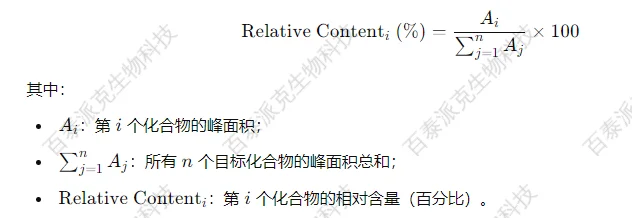
2. Operating Procedure
1. Export Peak Area Data
Export the peak areas of all detected compounds from the instrument software (usually the integral values of each component in the TIC total ion chromatogram).
2. Select Target Compounds
Remove solvent peaks, internal standard peaks (if any), noise, or unknown components that do not need to be included in the statistics.
3. Calculate Total Peak Area
Sum of the peak areas of all selected components.
4. Calculate the Proportion of Each Component
Divide the area of each component by the total area and multiply by 100 to get the relative content percentage.
3. Notes
1. This method cannot reflect absolute concentrations, only used for comparing the relative proportions of different components in a sample, especially suitable for exploratory experiments such as metabolomics and volatile analysis.
2. If an internal standard method is used, further semi-quantitative or absolute quantification can be performed, and the calculation method will be discussed separately.
3. If the response factors of some components vary greatly (such as volatile compounds with significant structural differences), the relative content results should be interpreted with caution.
Bio-tech & Bio-pharma - A Premier Service Provider for Bioproduct Characterization and Multi-omics Mass Spectrometry
Related Services:
How to order?